

Express Rip is a CD ripping app that allows you to extract audio tracks from audio CDs. The tool supports a lot of target formats, such as .mp3, .wma, .ogg, .aac, .aif, .m4a, and many others.
It comes with an uncluttered interface that helps you work with the program easily. While the installing process is in progress, you are invited to download some additional programs; it is your choice whether you're going to use them or not. For instance, 'WavePad' is an audio editor that can be used for trimming and recording. 'Express Burn' allows you to burn CDs or DVDs, while 'Switch' may be used for converting purposes.
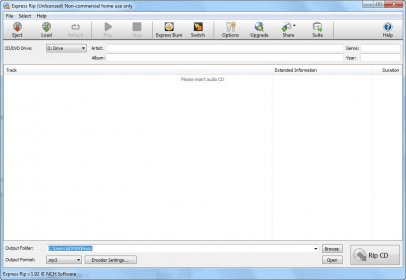
The first thing you need to set before you start ripping is the CD/DVD drive. Once the proper drive is selected, you can insert the CD into the computer. The program analyzes the disk and displays all available tracks. It also shows some information about each track, such as duration, artist, album, genre and year. In order to get this information the tool automatically accesses its online database. However, I've noticed that sometimes the info is not very accurate.
Once you've determined the tracks you want to rip, you just choose the output location and format. As I have already mentioned before, the application supports all the popular audio formats. You can also modify some encoder settings by selecting the bitrate or the encoding channel. From the Options menu you can add tag information to the ripped files or set the file name format.
To sum up, this is a nice tool that gets your job done quickly. Due to its well-structured interface, anyone can easily use the program. It can be quite helpful in situations when you want to transfer your audio collection to your computer.






Comments (2)
Track number - Track Title.
Any help please?